Invitations and Roles
Find out how to add colleagues to your TariffPilot tenant, assign roles, and manage their user accounts.
To invite your colleagues to join, click on the Invite teammates👋 tab in the upper left corner beneath your tenant.
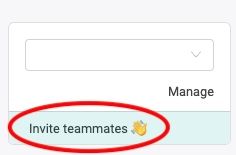
This will direct you to your settings, where you will find your current user accounts.
User Accounts
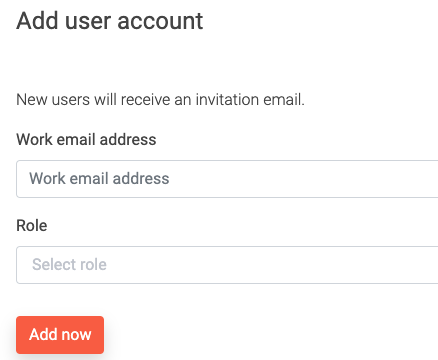
Here you have an overview of the existing accounts for this tenant. As an owner you can add new users and invite colleagues. Scroll down to Add user account. All you need to do is enter the email address, name and role of the new user.
Roles
In TariffPilot, there are different roles that can be assigned to users. Each role has specific permissions that determine what actions a user can perform within the platform. Below is a list of the available roles and their permissions:
| Role | User | Customs Tariff Proposals | Classification Proposals | AI Training | Reference Data |
|---|---|---|---|---|---|
| Owner * | ✏️ | ✏️ | ✏️ | ✏️ | 👀 |
| Editor * | ✏️ | ✏️ | ✏️ | 👀 | |
| Revision * | 👀 | 👀 | 👀 | 👀 | |
| Customs Tariff Proposals Editor | ✏️ | ||||
| Customs Tariff Proposals Exporter | 👀 💾 | ||||
| Customs Tariff Proposals Viewer | 👀 | ||||
| Classification Proposals Editor | ✏️ | ||||
| Classification Proposals Viewer | 👀 | ||||
| AI Training Editor | ✏️ | ||||
| AI Training Exporter | 👀 💾 | ||||
| AI Training Viewer | 👀 |
✏️ Editor: Can create, edit, and delete content. 👀 Viewer: Can read content. 💾 Exporter: Can export content (PDF/Excel).
* Global roles that apply across all areas. All other roles are scoped to a single area — a user with only a scoped role sees just that one tab.
Customs Tariff Proposals covers single and bulk tariffing. Reference Data covers the BTIs (vZTA), Rulings, ECICS and HS lookups.
- Assign the Owner role to only a few people — it grants full control and is the only role that can add and manage user accounts.
- Use Editor for teammates who actively work across all areas (create, edit, delete).
- Use Revision for read-only oversight — for example, someone whose task is to monitor operations in the tenant.
- Use the feature-scoped roles (Customs Tariff Proposals, Classification Proposals, AI Training) to restrict a user to a single area — they will then only see that tab.
Change User Roles
To change the role of a user, go to the Invite teammates👋 tab in the upper left corner beneath your tenant. First delete the user and then invite them again with the new role.